
In today’s fast-paced business environment, providing efficient and effective IT support is critical. A responsive help desk can significantly impact customer satisfaction, employee productivity, and overall business success. However, managing a high volume of support requests while simultaneously ensuring the health and stability of IT infrastructure can be a significant challenge. That’s where the integration of Customer Relationship Management (CRM) tools with built-in Remote Monitoring and Management (RMM) capabilities comes into play, offering a powerful solution for streamlining help desk workflows and improving IT service delivery.
Traditional help desk systems often operate in silos, lacking real-time visibility into the underlying IT infrastructure. This can lead to delayed response times, inaccurate diagnoses, and ultimately, frustrated users. Technicians may spend valuable time gathering information manually, switching between different tools, and struggling to identify the root cause of issues. This inefficiency not only affects the help desk’s performance but also increases the risk of prolonged downtime and business disruption. The combination of CRM and RMM bridges this gap, creating a unified platform that empowers IT professionals to deliver proactive and data-driven support.
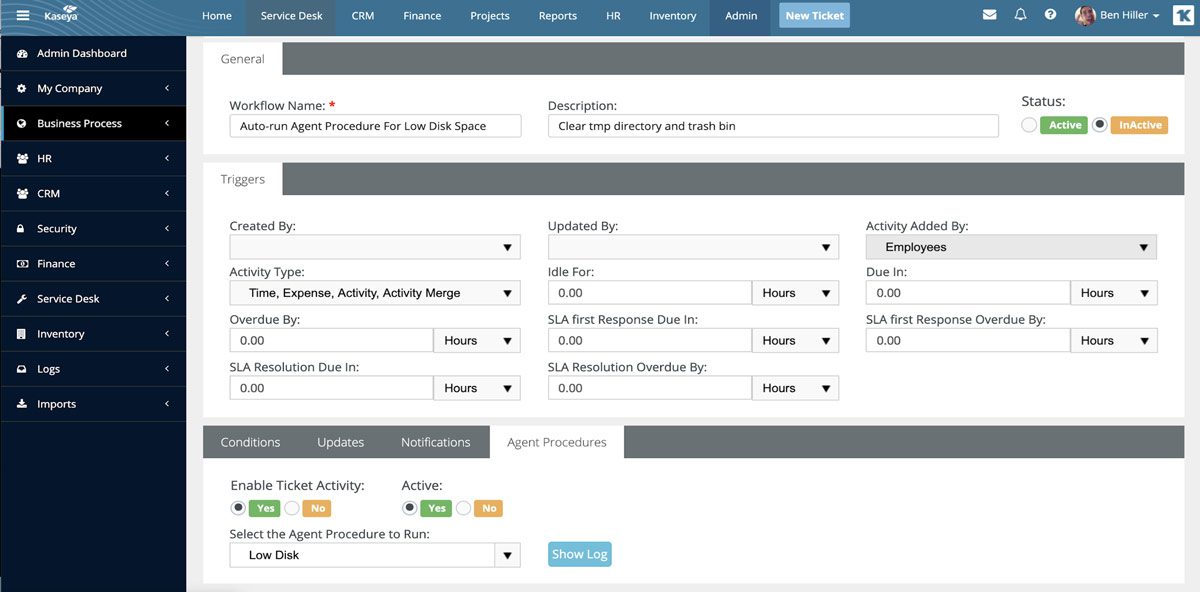
This article explores the benefits of enhancing help desk workflows through CRM tools with built-in RMM. We’ll delve into the key features of these integrated solutions, examine how they streamline support processes, and discuss the factors to consider when choosing the right platform for your organization. By understanding the power of CRM and RMM integration, businesses can transform their help desks from reactive problem-solvers to proactive IT service providers, ultimately driving greater efficiency, customer satisfaction, and business growth.
Understanding CRM and RMM: A Synergistic Approach
To fully appreciate the value of integrated CRM and RMM, it’s important to understand the individual roles of each component and how they complement each other.
What is CRM?
Customer Relationship Management (CRM) is a system for managing a company’s interactions with current and potential customers. It’s more than just a software platform; it’s a strategy for building and maintaining strong customer relationships. In the context of IT support, CRM helps track customer interactions, manage support requests, and provide a centralized repository of customer information. This includes contact details, service history, previous issues, and any relevant notes. A well-implemented CRM system enables help desk agents to provide personalized and efficient support, improving customer satisfaction and loyalty.
What is RMM?
Remote Monitoring and Management (RMM) is a suite of tools used to remotely monitor and manage IT infrastructure, including servers, workstations, network devices, and applications. RMM solutions provide real-time visibility into the health and performance of IT systems, allowing IT professionals to proactively identify and resolve potential issues before they impact users. Key features of RMM include remote access, automated patching, software deployment, and performance monitoring. By leveraging RMM, IT teams can reduce downtime, improve system performance, and ensure the security of their IT environment.
The Power of Integration
When CRM and RMM are integrated, they create a powerful synergy that transforms the help desk workflow. The integration allows for the seamless flow of information between the two systems, providing help desk agents with a comprehensive view of the customer’s environment and the underlying IT infrastructure. This eliminates the need to switch between multiple tools and manually gather information, saving time and improving efficiency. For example, when a user submits a support request through the CRM system, the agent can instantly access the RMM data for that user’s device, including its health status, software versions, and recent performance metrics. This allows the agent to quickly diagnose the issue and provide a targeted solution.
Benefits of CRM with Built-in RMM for Help Desk Workflows
The integration of CRM and RMM offers a multitude of benefits for help desk workflows, leading to improved efficiency, enhanced customer satisfaction, and reduced IT costs.
Improved Efficiency
One of the most significant benefits is the improvement in efficiency. By centralizing information and automating tasks, integrated CRM and RMM solutions streamline the support process. Agents can access all the information they need from a single interface, reducing the time spent searching for data and switching between applications. Automated workflows can also be implemented to handle routine tasks, such as ticket routing, issue escalation, and knowledge base searches. This allows agents to focus on more complex issues and provide faster resolution times.
Proactive Problem Resolution
RMM‘s monitoring capabilities enable proactive problem resolution. By identifying potential issues before they impact users, the help desk can prevent downtime and minimize disruptions. For example, if RMM detects that a server is running low on disk space, the help desk can proactively address the issue before it causes a system outage. This proactive approach not only improves user experience but also reduces the overall cost of IT support by preventing major incidents.
Enhanced Customer Satisfaction
Faster resolution times, proactive problem solving, and personalized support all contribute to enhanced customer satisfaction. When users experience minimal downtime and receive prompt and effective assistance, they are more likely to be satisfied with the IT services provided. Integrated CRM and RMM solutions also enable agents to provide more personalized support by accessing customer-specific information and tailoring their responses to individual needs. This personalized approach fosters stronger customer relationships and builds trust.
Data-Driven Decision Making
The integration of CRM and RMM provides a wealth of data that can be used to improve IT service delivery. By analyzing support tickets, RMM data, and customer feedback, IT teams can identify trends, pinpoint recurring issues, and optimize their support processes. For example, if a particular software application is consistently generating a high volume of support requests, the IT team can investigate the issue and implement a permanent fix. This data-driven approach enables continuous improvement and ensures that IT resources are allocated effectively. To streamline business operations and enhance customer relations, consider the advantages of Combining Crm & marketing automation
Reduced IT Costs
While the initial investment in an integrated CRM and RMM solution may seem significant, the long-term cost savings can be substantial. By improving efficiency, preventing downtime, and reducing the need for on-site support, these solutions can significantly lower IT costs. Automated patching and software deployment capabilities also reduce the time and effort required to manage IT systems, freeing up IT staff to focus on more strategic initiatives.
Key Features to Look for in an Integrated CRM and RMM Solution
When choosing an integrated CRM and RMM solution, it’s important to consider the specific needs of your organization and look for features that align with your requirements. Understanding the interconnectedness of these processes is key, as Roi Crm Rmm demonstrates how marketing investments directly translate into revenue growth and optimized resource allocation
Remote Access and Control
Robust remote access and control capabilities are essential for efficient problem resolution. The solution should allow agents to remotely access and control users’ devices, diagnose issues, and implement fixes without requiring on-site visits. Features such as screen sharing, remote command execution, and file transfer are crucial for resolving complex technical issues.
Automated Monitoring and Alerting
Automated monitoring and alerting are key to proactive problem resolution. The solution should continuously monitor IT systems and generate alerts when potential issues are detected. Customizable alert thresholds and notification settings allow IT teams to prioritize critical issues and respond promptly. The ability to integrate with third-party monitoring tools is also important for comprehensive monitoring coverage.
Patch Management and Software Deployment
Automated patch management and software deployment capabilities streamline IT system maintenance and ensure security. The solution should automatically deploy security patches and software updates to all managed devices, reducing the risk of vulnerabilities and malware infections. Centralized management of software licenses and configurations simplifies IT administration and ensures compliance.
Ticketing and Workflow Automation
A robust ticketing system is essential for managing support requests and tracking progress. The solution should allow users to submit support tickets through various channels, such as email, web portal, or phone. Automated workflow rules can be configured to route tickets to the appropriate agents, escalate issues based on severity, and trigger automated responses. Integration with knowledge base systems allows agents to quickly find solutions to common problems.
Reporting and Analytics
Comprehensive reporting and analytics capabilities provide valuable insights into IT service delivery. The solution should generate reports on key metrics, such as ticket volume, resolution times, and customer satisfaction. These reports can be used to identify trends, pinpoint areas for improvement, and measure the effectiveness of IT initiatives. Customizable dashboards provide a real-time view of IT performance and enable data-driven decision making.
Integration with Other Tools
The ability to integrate with other business tools, such as accounting software, project management systems, and communication platforms, is important for seamless workflow integration. Integration with these tools allows for the sharing of data and automation of tasks across different departments. Open APIs and webhooks enable custom integrations with other applications. Navigating the complexities of technology solutions often requires careful consideration, so Crm Rmm Choosing becomes a crucial step for businesses seeking optimized performance
Implementing CRM with Built-in RMM: Best Practices
Implementing an integrated CRM and RMM solution requires careful planning and execution to ensure a successful deployment.
Define Clear Goals and Objectives
Before implementing a new solution, it’s important to define clear goals and objectives. What are you hoping to achieve with the integration of CRM and RMM? Do you want to improve efficiency, enhance customer satisfaction, reduce IT costs, or all of the above? Defining clear goals will help you choose the right solution and measure the success of your implementation.
Assess Your Current IT Infrastructure
Before deploying the solution, assess your current IT infrastructure and identify any potential compatibility issues. Ensure that the solution supports your operating systems, hardware, and software applications. Perform thorough testing in a non-production environment before rolling out the solution to your entire organization.
Develop a Comprehensive Training Plan
Provide comprehensive training to your IT staff on how to use the new solution. Ensure that they understand the key features and functionalities and how to leverage them to improve their workflows. Provide ongoing training and support to ensure that they stay up-to-date with the latest features and best practices. Streamlining workflows and enhancing data visibility are key benefits, Crm Rmm Integration facilitating better decision-making for managed service providers
Monitor Performance and Gather Feedback
Once the solution is deployed, monitor its performance closely and gather feedback from your IT staff and users. Identify any areas for improvement and make adjustments as needed. Continuously evaluate the solution to ensure that it is meeting your goals and objectives.
Security Considerations
Security is paramount when implementing remote management tools. Ensure the chosen CRM/RMM platform has robust security features, including strong encryption, multi-factor authentication, and regular security audits. Implement strict access controls and monitor user activity to prevent unauthorized access. Educate your team on security best practices to avoid phishing attacks and other security threats. Now that we understand the challenges of modern IT environments, What Is Remote Monitoring and Management (RMM)? becomes a critical tool for proactive management
.
Conclusion
Enhancing help desk workflows with CRM tools that have built-in RMM capabilities is a strategic move for businesses seeking to optimize their IT support operations. By providing a unified platform for managing customer interactions and monitoring IT infrastructure, these solutions enable IT professionals to deliver proactive, efficient, and personalized support. The benefits of improved efficiency, enhanced customer satisfaction, reduced IT costs, and data-driven decision-making make integrated CRM and RMM a valuable investment for any organization. By carefully selecting the right solution and implementing it effectively, businesses can transform their help desks from reactive problem-solvers to proactive IT service providers, ultimately driving greater success and growth.
Conclusion
In conclusion, integrating CRM tools with built-in RMM capabilities offers a transformative approach to help desk workflows. By centralizing client information, automating routine tasks, and proactively addressing technical issues, businesses can significantly improve efficiency, reduce response times, and enhance the overall customer experience. The synergy between CRM and RMM empowers help desk teams to provide more informed, personalized, and effective support, ultimately leading to increased customer satisfaction and loyalty.
The benefits of adopting this integrated approach are undeniable, ranging from streamlined operations to improved service delivery. As the demand for seamless and proactive IT support continues to grow, organizations should seriously consider leveraging the power of CRM tools with built-in RMM. Explore the available solutions and discover how this powerful combination can revolutionize your help desk operations and elevate your business to new heights. To learn more about specific vendors and their offerings, we encourage you to research and compare the leading CRM/RMM platforms available today. A well-informed decision can lead to significant improvements in your help desk’s efficiency and effectiveness.
Frequently Asked Questions (FAQ) about Enhancing Help Desk Workflows: CRM Tools with Built-in RMM
How can integrating a CRM tool with built-in RMM capabilities improve my help desk’s efficiency and reduce resolution times for IT support tickets?
Integrating a CRM tool with built-in Remote Monitoring and Management (RMM) capabilities significantly enhances help desk efficiency by providing a unified platform for managing customer relationships and proactively addressing IT issues. The RMM component allows technicians to remotely monitor endpoints, detect potential problems before they escalate, and perform maintenance tasks without interrupting the user. This proactive approach reduces the number of incoming support tickets. When tickets do arise, the CRM component provides immediate access to customer history, system information, and past interactions, enabling technicians to diagnose issues faster and provide more personalized support. The combined solution streamlines workflows, automates routine tasks, and empowers technicians with the data they need for quicker and more effective resolution, ultimately improving customer satisfaction and reducing resolution times.
What are the key benefits of using a CRM with integrated RMM for managing IT assets and providing proactive support to my clients?
Using a CRM with integrated RMM offers several key benefits for IT asset management and proactive support. Firstly, it provides a centralized view of all client IT assets, including hardware, software, and network devices, within the CRM platform. This visibility allows for better tracking of asset lifecycles, warranty information, and software licenses. Secondly, the RMM component enables proactive monitoring of these assets, detecting potential issues such as low disk space, failing hardware, or security vulnerabilities before they impact the user. This proactive approach minimizes downtime and prevents disruptions. Thirdly, the integration facilitates automated maintenance tasks, such as patching and software updates, ensuring that client systems are always up-to-date and secure. Finally, it improves overall client communication and satisfaction by providing faster response times and more personalized support based on a complete understanding of their IT environment. Data-driven insights from both the CRM and RMM allow for better strategic planning and resource allocation.
How does a CRM with built-in RMM help improve technician productivity and reduce the manual effort involved in managing IT support requests?
A CRM with built-in RMM significantly improves technician productivity and reduces manual effort by automating many time-consuming tasks and providing a unified platform for managing IT support requests. The RMM component automates tasks such as network discovery, asset inventory, and patch management, freeing up technicians to focus on more complex issues. The integrated CRM provides a centralized view of customer information, including support history, asset details, and service agreements, eliminating the need to switch between multiple systems. This single pane of glass reduces the time spent gathering information and allows technicians to quickly diagnose and resolve issues. Furthermore, automated alerts and notifications from the RMM proactively identify potential problems, enabling technicians to address them before they impact users. The combination of automation, centralization, and proactive monitoring streamlines workflows, reduces manual effort, and increases technician efficiency, leading to faster resolution times and improved customer satisfaction. Analyzing different platforms can be time-consuming, so researching Top Crm Tools is a smart first step