
CRM and RMM: Unlocking Proactive Support & Stronger Client Relations
In today’s competitive business landscape, providing exceptional customer service is no longer just a differentiator; it’s a necessity. Businesses, especially Managed Service Providers (MSPs) and IT support companies, are constantly seeking ways to improve efficiency, enhance client satisfaction, and ultimately, drive revenue growth. Two powerful tools, Customer Relationship Management (CRM) and Remote Monitoring and Management (RMM), play a crucial role in achieving these goals. While they serve distinct purposes, their synergy unlocks a new level of proactive support and strengthens client relationships in ways that standalone systems simply cannot.
Imagine a scenario where your support team is alerted to a potential server issue before the client even notices a slowdown. Or picture having a complete history of every interaction, device, and service associated with a particular client, instantly accessible to any team member. This isn’t just wishful thinking; it’s the reality enabled by integrating CRM and RMM systems. By combining the client-centric focus of CRM with the technical prowess of RMM, businesses can transform reactive problem-solving into proactive solution delivery, leading to happier clients, reduced downtime, and increased profitability.
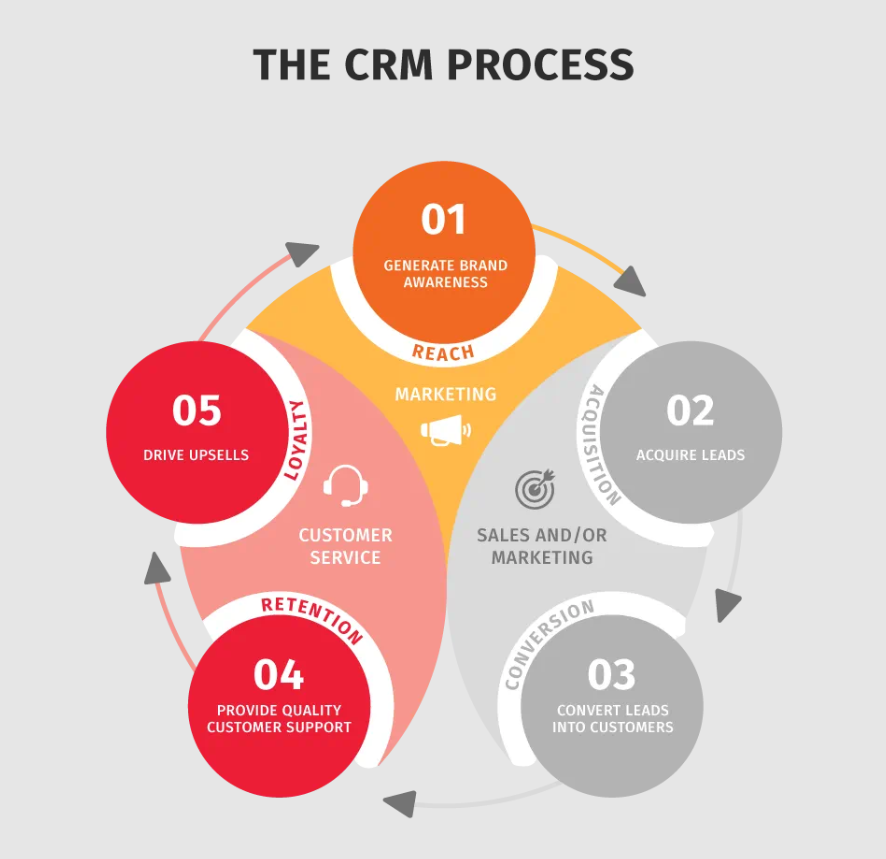
This article will delve into the core functionalities of CRM and RMM systems, explore the benefits of their integration, and provide practical insights into how businesses can leverage this powerful combination to unlock proactive support and cultivate stronger, more lasting client relationships. We’ll examine real-world examples, discuss common integration challenges, and offer guidance on selecting the right solutions to meet your specific business needs. Get ready to discover how CRM and RMM can revolutionize your approach to client management and service delivery.
Understanding CRM: The Foundation of Client Relationships
Customer Relationship Management (CRM) systems are designed to manage and analyze customer interactions and data throughout the customer lifecycle, with the goal of improving business relationships, assisting in customer retention, and driving sales growth. At its core, a CRM acts as a central repository for all client-related information, providing a 360-degree view of each customer.
Key Features of a CRM System
A robust CRM system typically includes the following features:
- Contact Management: Stores and organizes all contact information, including names, email addresses, phone numbers, and social media profiles.
- Sales Force Automation: Automates sales processes, such as lead management, opportunity tracking, and quote generation.
- Marketing Automation: Automates marketing campaigns, such as email marketing, social media marketing, and lead nurturing.
- Customer Service Management: Tracks and manages customer service requests, issues, and resolutions.
- Reporting and Analytics: Provides insights into customer behavior, sales performance, and marketing effectiveness.
Benefits of Using a CRM System
Implementing a CRM system offers numerous benefits, including:
- Improved Client Relationships: Provides a centralized view of client interactions, enabling personalized communication and better service.
- Increased Sales Productivity: Automates sales processes, freeing up sales representatives to focus on building relationships and closing deals.
- Enhanced Marketing Effectiveness: Enables targeted marketing campaigns based on customer data and behavior.
- Better Customer Service: Improves response times and resolution rates for customer service requests.
- Data-Driven Decision Making: Provides insights into customer behavior and business performance.
Understanding RMM: The Backbone of Proactive IT Support
Remote Monitoring and Management (RMM) systems are software platforms used by MSPs and IT departments to remotely monitor and manage their clients’ or their own IT infrastructure. RMM allows for proactive identification and resolution of IT issues, often before they impact end-users. For businesses seeking to optimize customer relations, Top Crm Tools offer a range of solutions tailored to specific needs
Key Features of an RMM System
A comprehensive RMM system typically includes the following features:. To streamline business processes and improve overall efficiency, Crm Rmm Integration is becoming increasingly vital for modern businesses
- Remote Monitoring: Continuously monitors servers, workstations, and network devices for performance issues, security threats, and other anomalies.
- Remote Access: Provides secure remote access to managed devices for troubleshooting and maintenance.
- Patch Management: Automates the process of patching software vulnerabilities to protect against security threats.
- Automation: Automates routine IT tasks, such as software deployment, configuration management, and system maintenance.
- Alerting and Reporting: Generates alerts when issues are detected and provides comprehensive reports on system performance and security.
Benefits of Using an RMM System
Implementing an RMM system offers significant advantages, including:
- Proactive Issue Resolution: Identifies and resolves IT issues before they impact end-users, minimizing downtime.
- Improved IT Efficiency: Automates routine IT tasks, freeing up IT staff to focus on more strategic initiatives.
- Enhanced Security: Protects against security threats by automating patch management and security monitoring.
- Reduced IT Costs: Minimizes downtime and reduces the need for on-site support, lowering overall IT costs.
- Standardized IT Management: Enforces consistent IT policies and procedures across all managed devices.
The Power of Integration: CRM and RMM Working Together
While both CRM and RMM systems provide valuable benefits on their own, their true potential is unlocked when they are integrated. The integration of these two systems creates a powerful synergy that enables proactive support, strengthens client relationships, and improves overall business performance.
Benefits of Integrating CRM and RMM
Integrating CRM and RMM offers a multitude of benefits, including:
- Proactive Support: RMM data can trigger alerts within the CRM, notifying support teams of potential issues before clients even notice them. This allows for proactive intervention and prevents disruptions to client operations.
- Enhanced Client Visibility: CRM provides a complete view of the client relationship, while RMM provides detailed technical information about their IT infrastructure. This combined view enables support teams to provide more informed and personalized support.
- Improved Communication: Integration allows for seamless communication between sales, support, and IT teams, ensuring that everyone is on the same page regarding client needs and issues.
- Automated Ticketing: RMM alerts can automatically create tickets in the CRM, streamlining the support process and ensuring that no issues are overlooked.
- Data-Driven Decision Making: Integration provides valuable insights into client IT infrastructure and usage patterns, enabling data-driven decision-making for sales, marketing, and support teams.
- Increased Client Satisfaction: Proactive support, personalized communication, and efficient issue resolution lead to increased client satisfaction and loyalty.
Real-World Examples of CRM and RMM Integration
Here are a few examples of how CRM and RMM integration can be used in practice:
- Server Downtime Alert: An RMM system detects that a client’s server is experiencing high CPU usage. This triggers an alert in the CRM, notifying the support team. The support team can then proactively contact the client to investigate the issue and prevent a potential server outage.
- Disk Space Running Low: An RMM system detects that a client’s workstation is running low on disk space. This triggers an alert in the CRM, prompting the support team to schedule a remote session to clean up the workstation or recommend a disk upgrade.
- Security Threat Detection: An RMM system detects a potential security threat on a client’s network. This triggers an alert in the CRM, notifying the security team. The security team can then immediately investigate the threat and take steps to mitigate the risk.
Choosing the Right CRM and RMM Solutions
Selecting the right CRM and RMM solutions for your business is crucial for maximizing the benefits of integration. Consider the following factors when making your decision:. Understanding the interplay between customer relationship management and revenue management is vital, as Roi Crm Rmm helps businesses optimize profitability and customer lifetime value
Factors to Consider When Choosing a CRM
- Business Needs: Identify your specific business needs and choose a CRM that offers the features and functionality to meet those needs.
- Integration Capabilities: Ensure that the CRM integrates seamlessly with your existing RMM system.
- Scalability: Choose a CRM that can scale to meet your growing business needs.
- Ease of Use: Select a CRM that is easy to use and navigate for your team.
- Cost: Consider the cost of the CRM, including implementation, training, and ongoing maintenance.
Factors to Consider When Choosing an RMM
- Functionality: Ensure that the RMM offers the features and functionality you need to monitor and manage your clients’ IT infrastructure.
- Integration Capabilities: Ensure that the RMM integrates seamlessly with your existing CRM system.
- Scalability: Choose an RMM that can scale to meet your growing business needs.
- Security: Select an RMM that offers robust security features to protect against security threats.
- Cost: Consider the cost of the RMM, including implementation, training, and ongoing maintenance.
Popular CRM and RMM Solutions
Some popular CRM solutions include:
- Salesforce
- Microsoft Dynamics 365
- HubSpot CRM
- Zoho CRM
Some popular RMM solutions include:. Navigating the software landscape requires careful consideration, so let’s determine how to approach Crm Rmm Choosing to optimize your business processes
- ConnectWise Automate
- Datto RMM
- Kaseya VSA
- N-able N-central
Implementing and Maintaining CRM and RMM Integration
Once you have selected your CRM and RMM solutions, the next step is to implement and maintain the integration. This process typically involves the following steps:
Implementation Steps
- Plan the Integration: Define your integration goals and develop a detailed implementation plan.
- Configure the Systems: Configure both the CRM and RMM systems to enable integration. This may involve installing plugins or configuring APIs.
- Test the Integration: Thoroughly test the integration to ensure that data is flowing correctly between the two systems.
- Train Your Team: Provide training to your team on how to use the integrated CRM and RMM systems.
- Monitor the Integration: Continuously monitor the integration to ensure that it is functioning properly.
Maintenance and Best Practices
- Regular Updates: Keep both the CRM and RMM systems up to date with the latest software releases.
- Data Synchronization: Ensure that data is synchronized regularly between the two systems.
- Performance Monitoring: Monitor the performance of the integration to identify and resolve any issues.
- Security Audits: Conduct regular security audits to ensure that the integration is secure.
- User Training: Provide ongoing training to your team on how to use the integrated CRM and RMM systems.
Conclusion: Embracing the Power of Integrated CRM and RMM
In conclusion, the integration of CRM and RMM systems is a game-changer for businesses seeking to provide proactive support and cultivate stronger client relationships. By combining the client-centric focus of CRM with the technical capabilities of RMM, businesses can unlock a new level of efficiency, responsiveness, and client satisfaction. From proactive issue resolution to personalized communication and data-driven decision-making, the benefits of CRM and RMM integration are undeniable.
By carefully selecting the right solutions, implementing a robust integration strategy, and maintaining the systems effectively, businesses can transform their approach to client management and service delivery. Embracing the power of integrated CRM and RMM is an investment in the future, paving the way for increased profitability, enhanced client loyalty, and sustained business growth. It’s not just about fixing problems; it’s about anticipating them and providing solutions before they even impact your clients.
As the IT landscape continues to evolve, the need for proactive and personalized support will only become more critical. By leveraging the synergy of CRM and RMM, businesses can stay ahead of the curve, deliver exceptional value to their clients, and build lasting relationships that drive long-term success. The future of IT support is proactive, and CRM and RMM are the keys to unlocking that future. Understanding the core concept of RMM is essential for IT professionals, What Is Remote Monitoring and Management (RMM)? as it allows for proactive issue resolution and efficient system maintenance
.
Conclusion
In conclusion, the synergistic relationship between CRM and RMM systems offers a powerful paradigm shift for businesses seeking to elevate their client support and foster stronger, more enduring relationships. By effectively integrating these two platforms, businesses can move beyond reactive troubleshooting to embrace proactive monitoring, anticipate client needs, and deliver exceptional service that truly differentiates them in a competitive marketplace. This proactive approach not only enhances client satisfaction and retention but also optimizes internal efficiency, freeing up valuable resources to focus on strategic growth initiatives.
Ultimately, the combined power of CRM and RMM unlocks a new level of operational excellence and client intimacy. We’ve explored how this integration fosters a deeper understanding of your clients’ environments, enabling you to preemptively address potential issues and offer tailored solutions. If you’re ready to transform your client support strategy and build lasting relationships, we encourage you to explore the CRM and RMM solutions available and consider how a strategic integration can benefit your organization. Learn more about specific integrations and best practices by visiting our resources page: https://www.example.com/resources.
Frequently Asked Questions (FAQ) about CRM and RMM: Unlocking Proactive Support & Stronger Client Relations
How can integrating my CRM (Customer Relationship Management) system with my RMM (Remote Monitoring and Management) platform help me provide more proactive IT support to my clients?
Integrating your CRM and RMM systems unlocks significant potential for proactive IT support. By connecting these platforms, you gain a unified view of your client’s environment and their specific needs. The RMM data, such as server health, application performance, and security alerts, flows directly into the CRM. This allows your support team to identify and address potential issues before they impact the client’s business. For example, if the RMM detects a failing hard drive, an automated alert can be generated in the CRM, prompting a proactive support ticket and allowing you to resolve the problem quickly, often before the client even notices. This proactive approach improves client satisfaction, reduces downtime, and strengthens your relationship with them.
What are the key benefits of using both a CRM and RMM solution together for a managed service provider (MSP), and how does this combination improve client communication and overall relationship management?
For managed service providers, the synergy between a CRM and RMM solution offers numerous advantages. Firstly, it centralizes client information, providing a comprehensive view of their infrastructure, support history, and contractual agreements. This leads to more informed decision-making and personalized service. Secondly, automated alerts from the RMM, integrated into the CRM, enable proactive communication. Instead of reacting to client complaints, you can inform them about potential issues and your planned solutions, building trust and demonstrating your value. Furthermore, the integrated data allows for better reporting and analytics, showcasing the effectiveness of your services and identifying areas for improvement. This transparency strengthens client relationships and fosters long-term partnerships. Finally, efficient ticket management within the CRM, triggered by RMM alerts, ensures faster response times and improved client satisfaction. To improve customer engagement, consider Combining Crm & marketing automation strategies
Besides proactive support, what other business processes can be streamlined by integrating a CRM with an RMM, and how does this impact the efficiency of an IT service business?
Integrating a CRM with an RMM extends beyond proactive support to streamline several other critical business processes, significantly impacting the efficiency of an IT service business. For example, automated billing becomes more accurate and efficient, as RMM data can be used to track usage-based services and automatically generate invoices within the CRM. Sales and marketing efforts are also enhanced, as the combined data provides insights into client needs and opportunities for upselling or cross-selling. The CRM can use RMM data to identify clients who might benefit from specific upgrades or security enhancements, enabling targeted marketing campaigns. Furthermore, resource allocation becomes more optimized, as the integrated system provides a clear view of workload distribution and technician availability. This improved efficiency translates to reduced operational costs, increased profitability, and the ability to scale the business more effectively.