
In today’s dynamic business environment, staying ahead of the curve requires more than just offering excellent products or services. It’s about building lasting relationships with your customers and proactively addressing their needs before they even arise. Traditionally, businesses have relied on separate systems to manage customer interactions and monitor the technical health of their operations. Customer Relationship Management (CRM) systems handled sales, marketing, and customer service, while Remote Monitoring and Management (RMM) systems focused on IT infrastructure, security, and performance.
However, a new paradigm is emerging: the CRM–RMM hybrid. This integration bridges the gap between customer-facing activities and the underlying technology that supports them. By combining the power of CRM and RMM, businesses can gain unprecedented insights into their customers’ experiences, anticipate potential problems, and deliver proactive solutions. This fusion not only enhances customer satisfaction but also streamlines operations and drives revenue growth.
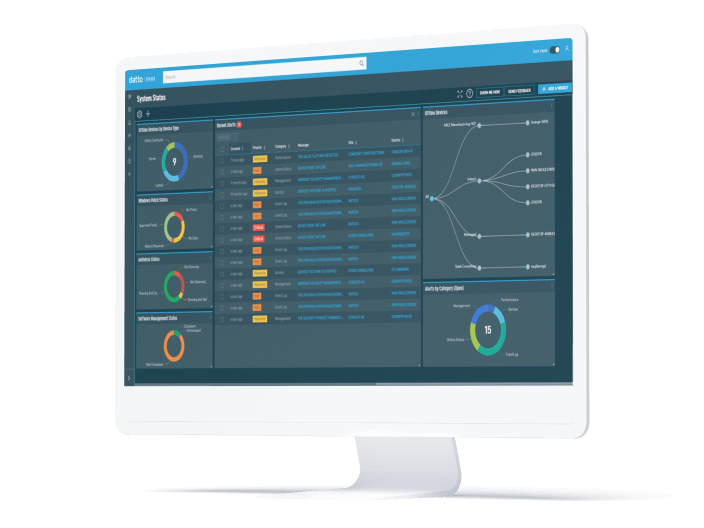
This article delves into the world of CRM–RMM hybrids, exploring their benefits, key features, implementation strategies, and potential challenges. We’ll examine how this integrated approach can transform the way businesses interact with their customers and manage their IT infrastructure, ultimately leading to improved efficiency, enhanced customer loyalty, and a stronger competitive advantage. Whether you’re a managed service provider (MSP), a small business owner, or an enterprise IT leader, understanding the potential of CRM–RMM integration is crucial for navigating the complexities of the modern business landscape.
Understanding CRM and RMM: A Foundation for Integration
Before diving into the specifics of a CRM–RMM hybrid, it’s essential to understand the individual roles and functionalities of CRM and RMM systems. Each plays a distinct but equally important role in supporting business operations.
Customer Relationship Management (CRM)
At its core, a CRM system is designed to manage and analyze customer interactions and data throughout the customer lifecycle. It helps businesses improve customer relationships, assist in customer retention, and drive sales growth. Key features of a CRM system typically include:
- Contact Management: Centralized storage and organization of customer information, including contact details, communication history, and account details.
- Sales Force Automation: Tools to streamline sales processes, such as lead management, opportunity tracking, and quote generation.
- Marketing Automation: Features to automate marketing campaigns, track marketing performance, and personalize customer communications.
- Customer Service Management: Tools to manage customer support requests, track service tickets, and resolve customer issues.
- Reporting and Analytics: Dashboards and reports to track key performance indicators (KPIs), analyze customer behavior, and identify trends.
Popular CRM platforms include Salesforce, Microsoft Dynamics 365, HubSpot CRM, and Zoho CRM. Streamlining workflows and boosting efficiency are key benefits of Crm Rmm Integration, allowing for more effective management of client relationships and IT infrastructure
Remote Monitoring and Management (RMM)
RMM systems, on the other hand, are primarily focused on monitoring and managing IT infrastructure remotely. They are widely used by managed service providers (MSPs) to proactively address IT issues, ensure system uptime, and maintain network security. Key features of an RMM system typically include:
- Remote Monitoring: Real-time monitoring of servers, networks, workstations, and other IT devices.
- Patch Management: Automated patching of software vulnerabilities to maintain system security and stability.
- Remote Access: Secure remote access to client systems for troubleshooting and maintenance.
- Alerting and Notification: Automated alerts and notifications when critical issues are detected.
- Automation: Scripting and automation capabilities to automate routine tasks and improve efficiency.
Common RMM platforms include ConnectWise Automate, Datto RMM, Kaseya VSA, and SolarWinds N-central.
The Power of Integration: Benefits of a CRM–RMM Hybrid
Integrating CRM and RMM systems unlocks a multitude of benefits that can significantly improve business operations, enhance customer satisfaction, and drive revenue growth. Here are some of the key advantages:
Proactive Customer Support
By integrating RMM data into the CRM system, customer service representatives gain real-time visibility into the technical health of a customer’s IT infrastructure. This allows them to proactively identify and resolve potential issues before they impact the customer’s business. For example, if an RMM system detects that a customer’s server is running low on disk space, a customer service representative can proactively reach out to the customer and offer assistance before the server crashes and disrupts their operations.
Enhanced Customer Experience
A CRM–RMM hybrid enables businesses to deliver a more personalized and proactive customer experience. By understanding both the customer’s business needs (through CRM) and the technical health of their IT infrastructure (through RMM), businesses can tailor their services and support to meet the specific requirements of each customer. This can lead to increased customer satisfaction, loyalty, and retention.
Improved Operational Efficiency
Integrating CRM and RMM systems can streamline workflows and improve operational efficiency. By automating tasks such as ticket creation, issue resolution, and customer communication, businesses can free up their staff to focus on more strategic initiatives. For example, when an RMM system detects a critical issue, it can automatically create a service ticket in the CRM system, assign it to the appropriate technician, and notify the customer. This eliminates the need for manual intervention and ensures that issues are addressed promptly.
Data-Driven Decision Making
A CRM–RMM hybrid provides businesses with a wealth of data that can be used to make more informed decisions. By analyzing data from both systems, businesses can gain insights into customer behavior, identify trends, and optimize their service offerings. For example, by analyzing RMM data, businesses can identify common IT issues that are affecting their customers and develop proactive solutions to prevent those issues from recurring.
Increased Revenue Opportunities
By proactively identifying and resolving customer issues, a CRM–RMM hybrid can help businesses increase revenue opportunities. For example, if a business detects that a customer’s server is outdated, they can proactively recommend an upgrade. By providing proactive and valuable services, businesses can build trust with their customers and increase their chances of winning new business.
Key Features of a Successful CRM–RMM Integration
To maximize the benefits of a CRM–RMM hybrid, it’s important to ensure that the integration is well-planned and executed. Here are some key features to look for in a successful integration:
Seamless Data Synchronization
The integration should allow for seamless data synchronization between the CRM and RMM systems. This ensures that information is always up-to-date and accurate in both systems. This includes synchronizing customer contact information, device information, service tickets, and other relevant data. Optimizing sales processes is crucial for business growth, and understanding the interplay of Roi Crm Rmm can help achieve that goal
Automated Ticket Creation
The integration should automate the creation of service tickets in the CRM system when critical issues are detected by the RMM system. This eliminates the need for manual ticket creation and ensures that issues are addressed promptly.
Real-Time Alerts and Notifications
The integration should provide real-time alerts and notifications to customer service representatives when critical issues are detected. This allows them to proactively reach out to customers and offer assistance.
Integrated Dashboards and Reporting
The integration should provide integrated dashboards and reporting that allow businesses to track key performance indicators (KPIs) and analyze customer behavior. This helps them make more informed decisions and optimize their service offerings. To enhance operational efficiency, consider Combining Crm & marketing automation systems
Customizable Workflows
The integration should be customizable to meet the specific needs of the business. This allows businesses to tailor the integration to their unique workflows and processes.
Implementing a CRM–RMM Hybrid: A Step-by-Step Guide
Implementing a CRM–RMM hybrid can be a complex process, but by following a structured approach, businesses can ensure a successful integration. Here’s a step-by-step guide:
1. Define Your Goals and Objectives
Before starting the integration process, it’s important to clearly define your goals and objectives. What do you hope to achieve by integrating CRM and RMM systems? Are you looking to improve customer satisfaction, streamline operations, or increase revenue? Clearly defining your goals will help you stay focused and ensure that the integration is aligned with your business objectives.
2. Choose the Right Integration Method
There are several different methods for integrating CRM and RMM systems, including:
- Native Integration: Some CRM and RMM vendors offer native integrations between their platforms. This is often the simplest and most seamless integration option.
- Third-Party Integrations: There are also third-party integration platforms that can connect CRM and RMM systems. These platforms offer more flexibility and customization options.
- Custom Integration: For businesses with unique requirements, a custom integration may be the best option. This involves developing a custom integration solution using APIs and other technologies.
Choose the integration method that best meets your needs and budget.
3. Plan the Integration Process
Once you’ve chosen an integration method, it’s important to plan the integration process carefully. This includes identifying the data that needs to be synchronized, defining the workflows that need to be automated, and assigning roles and responsibilities to team members.
4. Test the Integration Thoroughly
Before deploying the integration to a production environment, it’s important to test it thoroughly to ensure that it’s working as expected. This includes testing data synchronization, automated workflows, and alerts and notifications.
5. Train Your Staff
Once the integration is deployed, it’s important to train your staff on how to use it effectively. This includes training customer service representatives on how to use RMM data to proactively address customer issues and training IT staff on how to use CRM data to improve their service delivery.
Challenges and Considerations
While the benefits of a CRM–RMM hybrid are significant, there are also some challenges and considerations to keep in mind:
Data Security and Privacy
Integrating CRM and RMM systems can raise concerns about data security and privacy. It’s important to ensure that the integration is secure and that data is protected in accordance with relevant regulations, such as GDPR and HIPAA.
Complexity and Cost
Implementing a CRM–RMM hybrid can be a complex and costly undertaking. It’s important to carefully evaluate the costs and benefits of the integration before proceeding. Having established the potential challenges of IT infrastructure, What Is Remote Monitoring and Management (RMM)? becomes a crucial consideration for many organizations
.
Change Management
Implementing a CRM–RMM hybrid can require significant changes to business processes and workflows. It’s important to manage these changes effectively to minimize disruption and ensure that staff are able to adapt to the new system.
The Future of CRM–RMM Hybrids
The CRM–RMM hybrid is poised to become an increasingly important tool for businesses of all sizes. As IT infrastructure becomes more complex and customer expectations continue to rise, the need for integrated solutions that can proactively address customer needs will only grow stronger. Expect to see further advancements in AI-powered automation, predictive analytics, and enhanced security features within these integrated platforms, making them even more valuable for businesses looking to stay ahead of the curve.
Ultimately, the CRM–RMM hybrid represents a shift towards a more proactive, customer-centric approach to IT management. By breaking down the silos between customer relationship management and remote monitoring, businesses can unlock new levels of efficiency, enhance customer satisfaction, and drive sustainable growth. Navigating the options can be complex, so understanding the nuances of Crm Rmm Choosing is key to making the right technology investment
Conclusion
The convergence of CRM and RMM systems into a cohesive CRM–RMM hybrid represents a significant leap forward for businesses seeking to optimize their operations and elevate customer satisfaction. Throughout this article, we’ve explored how this integrated approach empowers businesses to proactively address technical issues, personalize customer interactions, and ultimately, foster stronger, more profitable relationships. By breaking down the silos between sales, support, and IT management, the CRM–RMM hybrid unlocks a holistic view of the customer journey, enabling data-driven decision-making and unparalleled responsiveness.
In essence, the CRM–RMM hybrid is more than just a technological upgrade; it’s a strategic investment in customer-centricity. As businesses increasingly prioritize customer experience, the ability to anticipate needs, resolve issues efficiently, and cultivate lasting relationships becomes paramount. If you’re ready to move beyond reactive problem-solving and unlock the full potential of your customer relationships, we encourage you to explore the benefits of integrating your CRM and RMM systems. The future of customer relationship management is proactive, personalized, and powered by the CRM–RMM hybrid. Learn more about how a CRM–RMM hybrid can transform your business by visiting our resource page.
Frequently Asked Questions (FAQ) about Remote Monitoring Meets Customer Relationship: The CRM-RMM Hybrid
How can integrating a Customer Relationship Management (CRM) system with a Remote Monitoring and Management (RMM) platform improve our IT support services and customer satisfaction?
Integrating a CRM with an RMM platform provides a holistic view of the customer and their IT environment, significantly improving IT support and customer satisfaction. The RMM provides real-time data on the client’s infrastructure, identifying potential issues before they escalate. This data is then fed into the CRM, giving support staff immediate context about the client’s hardware, software, and service history. This allows for proactive support, faster resolution times, and more personalized interactions. For example, technicians can anticipate client needs based on monitoring data and proactively offer solutions, leading to increased customer loyalty and a better overall service experience. This also enables better tracking of service level agreements (SLAs) and efficient reporting on performance metrics. To streamline your sales process and enhance customer relationships, exploring Top Crm Tools is a crucial step
What are the key benefits of using a combined CRM-RMM solution for managed service providers (MSPs) compared to using standalone CRM and RMM tools?
The benefits of a combined CRM-RMM solution for MSPs are substantial compared to using standalone tools. Primarily, it eliminates data silos and streamlines workflows. With separate systems, information must be manually transferred, leading to inefficiencies and potential errors. An integrated solution automates data sharing, providing a single source of truth. This allows for improved operational efficiency by automating tasks such as ticket creation based on alerts from the RMM. It also enhances sales and marketing efforts by providing a comprehensive view of customer needs and service history within the CRM. Furthermore, integrated reporting capabilities offer better insights into performance, profitability, and customer satisfaction, allowing MSPs to make data-driven decisions and optimize their service delivery.
What specific features should I look for when choosing a CRM-RMM hybrid solution to ensure it meets the needs of our growing IT services business?
When selecting a CRM-RMM hybrid solution for a growing IT services business, several key features should be considered. First, look for robust automation capabilities that can streamline workflows, such as automated ticket creation, patching, and software deployment. Second, ensure the solution offers comprehensive reporting and analytics, providing insights into key performance indicators (KPIs), customer satisfaction, and service delivery efficiency. Third, consider the integration capabilities with other essential business tools, such as accounting software and project management platforms. Fourth, the solution should offer strong security features to protect sensitive customer data and infrastructure. Finally, prioritize user-friendliness and scalability to ensure the platform can adapt to the evolving needs of your business and is easy for your team to adopt and use effectively. Look for solutions that provide role-based access control and customizable dashboards to enhance usability.